
Madhya Pradesh Voter List 2025 PDF – Check Name & Download List
The Madhya Pradesh Chief Electoral Officer (CEO) has released the MP Voter List 2025 with photos, allowing citizens to search for their names in the final PDF electoral roll. Voters can also download their new Madhya Pradesh Voter ID Card directly from the official website.
Residents can now check their names district-wise in the CEO MP Voter List 2025 with photos and download their Voter ID cards. The updated MP Electoral Rolls 2025 are available in PDF format, making it easy for people to find their names and obtain their voter ID before casting their votes.
The complete MP Electoral Roll (Voter List) 2025 PDF is now accessible online. Citizens can manually search their names in the list or use a convenient online method to check their details by name, EPIC number, or other information.
MP Voter List with Photo (PDF Electoral Roll) Download
Below is the complete procedure to download PDF Electoral Rolls / Final Voter List 2025 Madhya Pradesh:-
STEP 1: Visit the ECI portal, navigate to the dedicated E-Roll Download section of the Election Commission of India’s official website: https://voters.eci.gov.in/download-eroll
STEP 2: Select your state, from the drop-down menu on the page, select “Madhya Pradesh” as the state.

STEP 3: Choose district and constituency, subsequently, the list of all MP districts will appear.

STEP 4: Select your District, followed by your specific Assembly Constituency from the next drop-down menu.

STEP 5: Select roll details language, choose the language (e.g., Hindi or English) in which you want to view the list.

STEP 6: Roll Type, select the desired roll type. To get the most current list, look for the “SIR Final Roll” or “Final Electoral Roll” for the latest year (e.g., Final Roll 2025). A list of all polling stations (Part Numbers) within the selected Assembly Constituency will be displayed. You can search or scroll through the list to find your specific polling station.

STEP 7: Select the Part Number(s) for the polling station(s) you need. Enter the provided Captcha text. Click on the “Download Selected PDF’s” button. The file(s) will be downloaded to your device. You can then save the electoral roll PDF to your preferred location as shown here:-
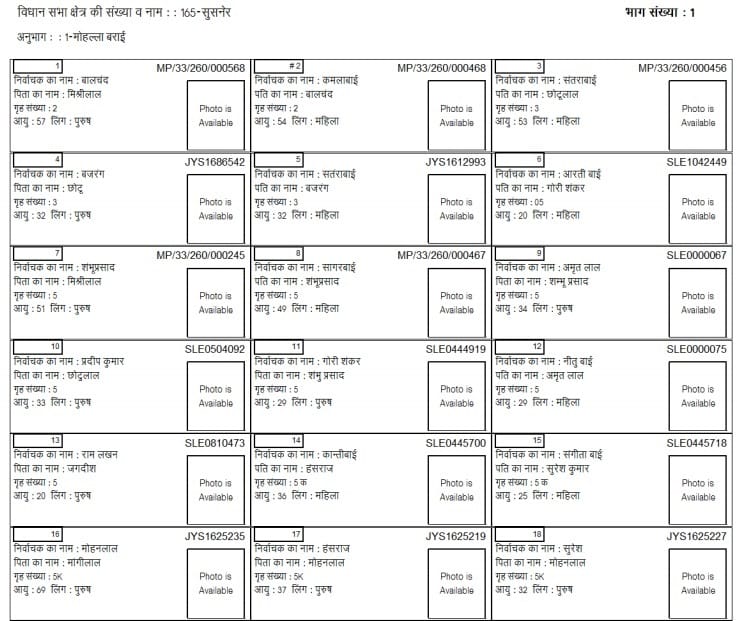
STEP 7: Here candidates can search their name manually in the MP Voter List Final Mother Electoral Roll 2025.
MP Voter ID Card Download – Find Name Online in MP Voter List 2025
All the people can now search their electoral details, find name online in the MP Voter List 2025 and download MP Voter ID Card through the link given here – https://electoralsearch.eci.gov.in/

You have a choice to find your name in the MP Voters List 2025 either by details or with EPIC number or with mobile number.
CEO Madhya Pradesh Helpdesk
CEO MP Helpline: 1800-2330-1950
CEO E-Mail ID: ceo_madhyapradesh[at]eci[dot]gov[dot]in
Furthermore, all those people whose name does not appears in the list does not have to worry. They can make online enrollment for the MP CEO Voter List 2025 and can then download their Voter ID Card. For any query, call on 1950 toll free helpline number for citizen services.